As of now, TallyPrime 7.2 is the latest version of Tally Prime. Tally writes the product name as one word, TallyPrime 7.2; the two-word spelling Tally Prime 7.2 refers to exactly the same release, so either way of searching leads to the same version.
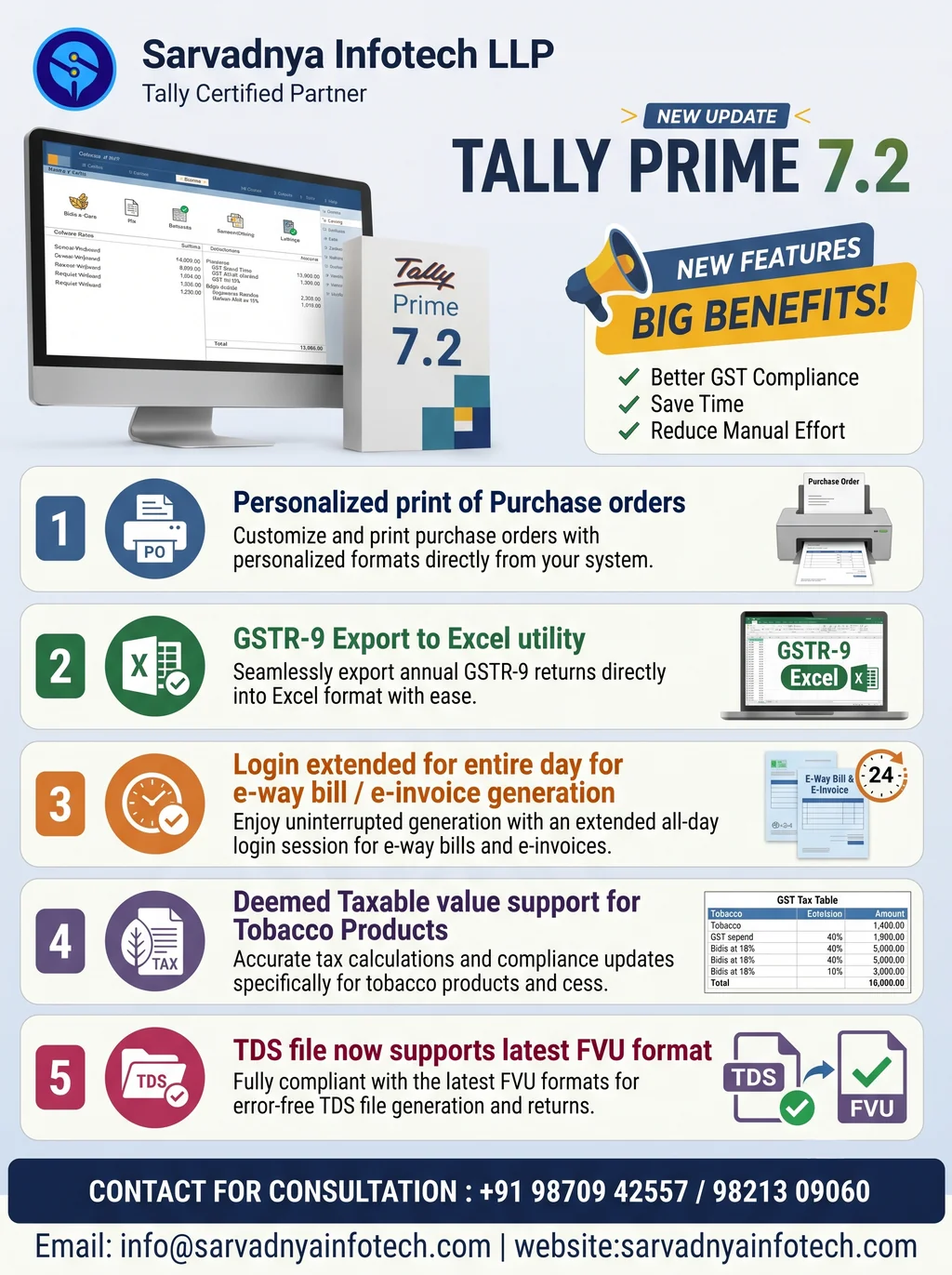
TallyPrime 7.2 is a compliance and productivity release. It adds five features that take manual work out of GST returns, purchase order printing, e-way bill and e-invoice generation, tobacco cess calculations and TDS filing, without changing the way you record day-to-day vouchers.
New features in TallyPrime 7.2
| Feature | What it does |
|---|---|
| Personalized print of purchase orders | Customize and print purchase orders with personalized formats directly from your system. |
| GSTR-9 export to Excel utility | Seamlessly export annual GSTR-9 returns directly into Excel format with ease. |
| Login extended for the entire day for e-way bill / e-invoice generation | Enjoy uninterrupted generation with an extended all-day login session for e-way bills and e-invoices. |
| Deemed taxable value support for tobacco products | Accurate tax calculations and compliance updates specifically for tobacco products and cess. |
| TDS file now supports the latest FVU format | Fully compliant with the latest FVU formats for error-free TDS file generation and returns. |
What each 7.2 update means for your team
- Personalized print of purchase orders - your purchase order layout is stored in TallyPrime, so the same format prints every time instead of being rebuilt in Word or Excel.
- GSTR-9 export to Excel utility - the annual return moves straight into a spreadsheet, which is what your accountant needs for reconciliation before filing.
- All-day login for e-way bill and e-invoice generation - the session no longer interrupts you in the middle of a dispatch day, so documents are generated when the goods actually move.
- Deemed taxable value for tobacco products - deemed value and cess follow the statutory rule for tobacco inside TallyPrime instead of being calculated outside it.
- TDS file with the latest FVU format - the TDS file is generated in the format the FVU validation utility expects, so the validation step stops failing on an old format.
Why businesses upgrade to 7.2
| Benefit | Where it shows up in 7.2 |
|---|---|
| Better GST compliance | GSTR-9 export to Excel, deemed taxable value for tobacco, and the latest TDS FVU format |
| Save time | Purchase orders print from a saved format and e-way bills generate without a mid-day re-login |
| Reduce manual effort | Fewer spreadsheets, fewer re-typed documents and fewer validation failures |
How to check which TallyPrime version you are on
- Open TallyPrime.
- Press F1 (Help) and open About. The product information screen shows the TallyPrime release you are running.
- Compare that release with 7.2. If it shows an older release, you are not on the latest version.
The release shown on the About screen changes only when the newer build is actually installed on that machine. If it still shows an older release after an update attempt, the update has not been applied there.
Upgrade to TallyPrime 7.2 safely
An update is quick, but the order of the steps is what protects your books:
- Take a backup of every company you work in, and confirm the backup is readable before you start.
- Update one computer first, then open your regular reports - trial balance, GST reports and TDS - and compare the figures with the pre-update numbers.
- Update the other computers on the network only after the first one matches.
- If you use custom TDL modules or Tally add-ons, have them validated against 7.2 before the rest of the team moves.
Customisation is the usual reason an update stalls. A TDL written for an older release has to be checked against the new build before it is trusted with live data, which is why we test modules on a copy of your data first.
Need help with the upgrade?
We install and validate the update, keep your data on a verified backup, and check your GST and TDS outputs before the team goes back to work.
FAQs
Is it TallyPrime 7.2 or Tally Prime 7.2?
Both names refer to the same release. Tally writes the product name as one word, TallyPrime 7.2, while Tally Prime 7.2 is the two-word spelling most people type into search. The version, the five features and the upgrade steps are identical.
What is the latest version of Tally Prime?
As of now, TallyPrime 7.2 is the latest version of Tally Prime. It adds five features: personalized print of purchase orders, GSTR-9 export to Excel, login extended for the entire day for e-way bill and e-invoice generation, deemed taxable value support for tobacco products, and TDS files in the latest FVU format.
What are the new features in TallyPrime 7.2?
TallyPrime 7.2 brings personalized print of purchase orders, a GSTR-9 export to Excel utility, an all-day login session for e-way bill and e-invoice generation, deemed taxable value support for tobacco products with cess, and TDS file support for the latest FVU format.
How do I check which Tally Prime version I am using?
Open TallyPrime, press F1 (Help) and open About. The product information screen shows the release you are running. If it is older than 7.2, you are not on the latest version.
What should I do before updating to TallyPrime 7.2?
Take a backup of every company you work in, update one computer first, and compare your trial balance, GST reports and TDS outputs with the pre-update figures before updating the rest of the network.
Do custom TDL modules need to be checked after upgrading to 7.2?
Yes. A custom TDL module or Tally add-on built for an older release should be validated against TallyPrime 7.2 on a copy of your data before it is used in live work.
Release Validation for Custom Modules
Our custom TDL modules are validated for compatibility. We test and adjust your modules against TallyPrime 7.2 on a copy of your data before you go live.
Learn More